
Clover Setup GuideCreate an Employee Account for Clubspeed
- Create a Clover account and log in.
- From the left-hand navigation menu, select Employees.
- Click + Add Employee.
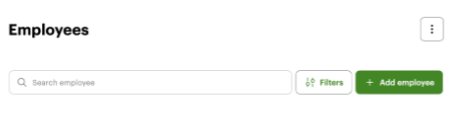
- Add merchantservices@clubspeed.com as an Admin.
Once the employee has been added, contact merchantservices@clubspeed.com or Resova Support. A team member will log in to your Clover account and sync your device.
Helpful Clover Resources
🔧 Device Setup
Step-by-step instructions for getting your Clover system up and running.
Set Up Your Clover Device (U.S.)
🌐 Network & Connectivity
Troubleshoot Wi-Fi or Ethernet issues, reconnect your terminal, or verify your internet connection.
⚙️ Device Configuration
Learn how to configure your Clover device, manage system settings, install apps, and connect peripherals.
Clover Device Configuration Guide
💬 General Help & Resources
Browse FAQs, video tutorials, and additional support resources.