
Method 1: From the Customer List
-
Go to the Customers Section
Navigate to:
Customers > All Customers -
Select the Customer(s)
-
Click on the name of the customer you want to delete.
-
A green tick will appear when selected.
-
You can select multiple customers at once.
-
3. Delete the Customer(s)
-
-
Click the trash icon 🗑️ at the bottom center of the screen.
-

⚙️ Method 2: Using the Gear Icon
-
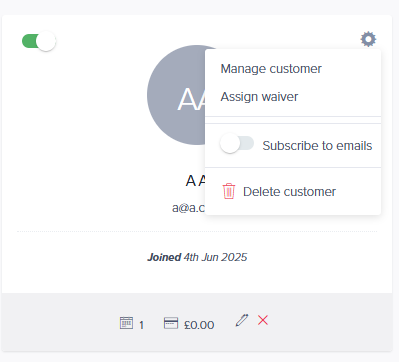
In the customer list, click the gear icon ⚙️ next to the customer’s name.
-
Select Delete from the dropdown menu.
📋 Method 3: From the Customer's Profile
-
Click on a customer’s name to open their profile.
-
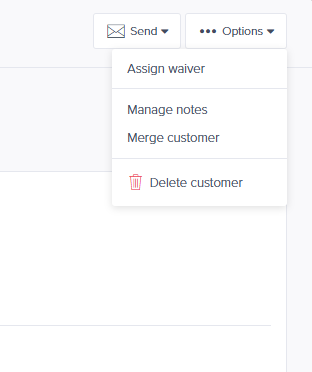
In the top right corner, click Options.
-
Select Delete Customer.
⚠️ Important Notes Before Deleting
You cannot delete a customer if they have:
-
Active or past bookings
-
Pending transactions
➡️ Please cancel bookings and resolve any transactions before trying to delete the customer.